
Subscription Stopper & Manager
InMarket Media, LLCFinance
3.92.13K Reviews
- Version
- 2.0.8
- Installs
- 100.00K
- Age Rating
- Everyone
Screenshots
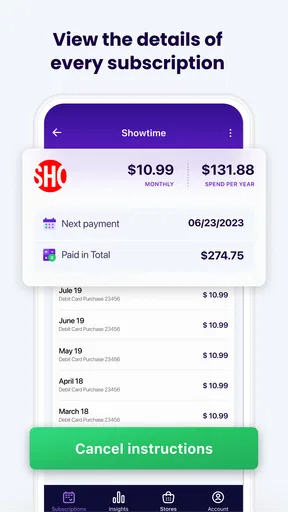
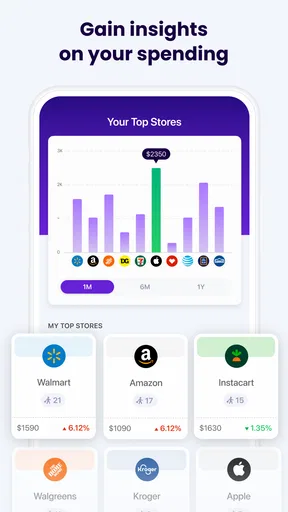
Our Review of Subscription Stopper & Manager
 Analysis by Appyee
Subscription charges are easy to overlook because each one can seem small on its own. I tried Subscription Stopper & Manager with that problem in mind: can a dedicated finance app make recurring costs easier to spot and act on? Its central appeal is putting subscription management at the center of the experience, rather than asking you to reconstruct those payments from memory or hunt through a general budgeting tool.
Why a subscription-focused view helps
When several services bill on different schedules, the challenge is not only the total. It is remembering which payment belongs to which service and when it is due. A subscription-focused approach can make that list easier to review and give you a practical starting point for deciding what still earns its place in your budget. I find that more useful than relying on a bank statement alone, where recurring charges sit among groceries, travel and one-off purchases.
That focus is also the main reason I would consider a specialist app instead of a spreadsheet. A spreadsheet gives you complete control, but you have to enter and update everything yourself. A general finance app may show spending across accounts, yet subscription decisions can get lost in the wider picture. This app is aimed at the narrower job: helping you pay attention to recurring commitments and manage them deliberately.
Turning a list into a useful routine
The best way to use a subscription manager is not to open it only after a surprise charge. I would treat a review of recurring payments as a small monthly habit: check which services you still use, note what is coming up, and decide whether to keep, pause or cancel where those choices are available. That routine can reveal a forgotten trial or a service you only needed for a short project before another renewal slips by.
One useful trick is to separate subscriptions by purpose in your own decision-making, even if the app presents them together. For example, distinguish essentials you rely on from entertainment you rotate, and from services tied to a temporary need. That makes it easier to cut costs without cancelling something important just because it appears on the same list. The app can help bring the charges into view; the judgement about their value is still yours.
A realistic month-end check
Imagine checking your finances near the end of the month and seeing a recurring charge for a video service you signed up for during a busy week. Rather than canceling in a rush, you can use the reminder of that payment to ask whether you watched anything recently, whether someone else in your household uses it, and whether you would choose it again at its current renewal point. If the answer is no, cancellation guidance may make the next step less of a chore.
This kind of review is especially helpful when subscriptions are spread across different services and dates. It replaces the vague feeling that “there are too many charges” with a more specific decision about each one. I would still keep confirmation emails or account records after cancelling; a management app can guide an action, but keeping your own proof is a sensible habit whenever billing is involved.
Where convenience has limits
A subscription tracker is only as helpful as the information it can surface and the actions it supports. Some services may be harder to identify, particularly niche products or charges described under a parent company rather than a familiar brand. That means I would compare any list in the app with recent statements instead of assuming it is a complete inventory. A missed item does not make the tool pointless, but it does mean a quick manual check remains worthwhile.
Cancellation can also depend on how you originally subscribed. A service billed through an app store, a mobile provider or a merchant may require you to follow that provider’s own process. In-app guidance can save time, but it is not the same as a universal cancellation button. Before relying on a cancellation as complete, look for a confirmation from the service and check that the renewal has actually been stopped.
There is a privacy trade-off to weigh before connecting financial accounts to any money-management app. I would read the app’s current privacy and security information carefully and decide whether account connection suits my comfort level. If you prefer not to link accounts, a manual tracker or a calendar reminder may feel more appropriate, even if it takes more upkeep. Convenience is valuable, but it should not outweigh your own requirements for handling financial information.
Who benefits most from this kind of tool
I see the strongest fit for people who have several recurring digital services, forget renewal dates, or want a clearer way to decide what to keep. It may also help someone who is trimming a household budget and wants to inspect recurring commitments separately from everyday spending. The app is less compelling if you have only one or two subscriptions and already track them reliably, or if you do not want to connect financial accounts and would rather maintain a simple list yourself.
As a finance app from InMarket Media, LLC, it has a specific purpose rather than trying to replace a full banking or budgeting setup. It is free to download, though in-app purchases range from about six dollars to about ninety-nine dollars per item, so I would check the purchase details before paying for anything. Its audience rating is Everyone, and it has a four-point-zero average from around three thousand six hundred ratings, with more than two thousand reviews and over one hundred thousand installs. Those figures suggest an established audience, but they do not tell you whether its account connections or cancellation options match your own situation.
What to check before you rely on it
If you are deciding whether to try it, start by asking what you need the app to do. Do you mainly want a place to review recurring costs, or do you expect it to cancel every service for you? The former is a realistic reason to use a subscription manager; the latter can lead to disappointment because providers handle cancellations in different ways. Treat any supported guidance as assistance, then verify the result with the company that bills you.
It is also worth considering how you pay for subscriptions. Charges on a connected account may be easier to notice than services billed through a different card, a family member’s account or a platform balance. If you share services with other people, ask them about charges before cancelling; a payment you rarely notice might still be important to someone else. A short conversation can prevent a cost-saving decision from disrupting a service your household uses.
The current version is 2.0.8 and it requires Android 7.0 or later. Since the app is available for Android and iOS, I would still check the requirements shown for your own device before installing. It was released on April 14, 2023, and remains a focused option for reviewing recurring expenses rather than a substitute for checking statements or managing every part of a budget.
My experience with the subscription-management approach
Have you ever found yourself knee-deep in subscriptions, wondering where your money is going every month? Well, you're not alone. I recently had the chance to try out the Subscription Stopper & Manager, and let me tell you, it's a game-changer. Here's a breakdown of my experience with this app that promises to help you regain control over your subscriptions.
First Impressions
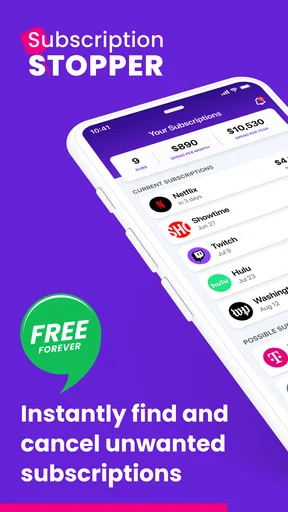
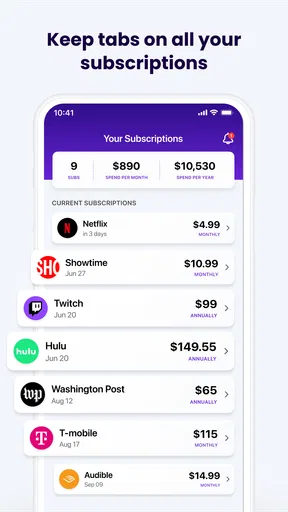
The moment I opened the app, I was greeted with a clean, intuitive interface. It's one of those apps where you immediately feel like you know your way around, even if it's your first time using it. The dashboard is straightforward, displaying all your active subscriptions in one place. If you're anything like me and prefer simplicity over clutter, you'll appreciate this aspect right off the bat.
Setting Up
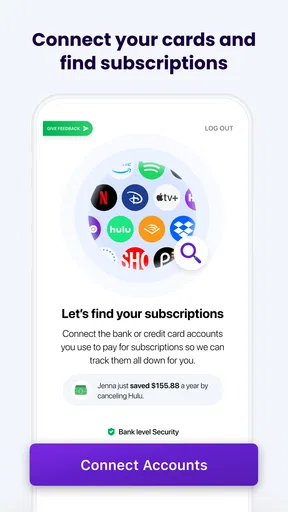
Setting up the app is a breeze. After downloading it from Google Play or the App Store, you simply connect your bank account or credit card. The app then scans for recurring charges, which is both fascinating and slightly terrifying to witness. It's like opening Pandora's box of forgotten subscriptions. This step is where the app shines, as it accurately identifies active subscriptions you might have completely forgotten about.
Features That Stand Out
One feature that I found particularly useful is the notification system. The app sends you alerts before any subscription renews, giving you ample time to decide whether you want to keep it or ditch it. It's like having a personal assistant reminding you of upcoming charges, and believe me, it’s a lifesaver. No more unexpected hits to your account!
Another nifty feature is the cancellation assistance. The app doesn’t just identify subscriptions; it provides guidance on how to cancel them. For some services, it even offers direct cancellation within the app, saving you from the dreaded customer service calls or emails.
Budgeting and Analytics
If you're someone who loves data, you'll enjoy the analytics section. It offers insights into your spending habits regarding subscriptions, allowing you to see where your money is going. You can set monthly budgets for subscriptions, helping you to plan and manage your finances without breaking a sweat. It’s like having a financial advisor in your pocket.
Security and Privacy
Now, I know what you're thinking: connecting your bank account to an app sounds risky. I had the same concern. However, the app uses bank-level encryption to protect your data. Plus, it doesn’t store your banking credentials on its servers, which is reassuring. It’s clear that they take security seriously, which makes it easier for me to trust the app.
Final Thoughts
All in all, the app is an impressive tool for anyone looking to get a handle on their subscription services. Whether you’re looking to save money, avoid unnecessary renewals, or just want to know where your money is going, this app has you covered. While it’s not perfect – as it sometimes misses niche subscriptions – it’s a huge step in the right direction for managing monthly expenses.
If you’re tired of being surprised by charges and want to take control of your digital spending, give Subscription Stopper & Manager a try. It might just be the app you didn’t know you needed.
Verdict
Strengths of Subscription Stopper & Manager
- Simple interface for easy navigation.
- Customizable alerts for deadlines.
- Supports multiple subscription types.
- Tracks subscription costs effectively.
- Secure data protection features.
Limitations of Subscription Stopper & Manager
- Limited support for international currencies.
- Requires manual input for some services.
- No offline mode available.
- Ads in free version can be intrusive.
- Lacks integration with some banks.
Similar Picks in This Category
View All
Google Wallet
Google LLC4.3

Airtel: Recharge, Bank & Loans
Airtel4.0

PayPal - Pay, Send, Save
PayPal Mobile4.2

DANA Indonesia Digital Wallet
PT Espay Debit Indonesia Koe4.5

Binance: Buy Bitcoin & Crypto
Binance Inc.4.8

Cash App
Block, Inc.4.7
Frequently Asked Questions
What is Subscription Stopper & Manager and how does it work?
Subscription Stopper & Manager is an app designed to help users manage and cancel unwanted subscriptions. It connects to your bank account to identify recurring payments and provides an easy interface to cancel subscriptions directly from the app. It's a convenient tool for managing expenses and avoiding unwanted charges.
Is Subscription Stopper & Manager safe to use with my bank details?
Yes, Subscription Stopper & Manager uses bank-level encryption to ensure your data is secure. It connects securely to your bank account without storing sensitive information, protecting your financial details while giving you full control over your subscriptions. Always check reviews and developer privacy policies for peace of mind.
Can I cancel any subscription using the app?
Subscription Stopper & Manager aims to cover a wide range of subscriptions, but its ability to cancel depends on the service provider’s policies. Most major services are supported, but for others, the app provides guidance on how to cancel manually if direct cancellation is not possible within the app.
Does the app offer notifications for upcoming subscription renewals?
Yes, the app provides notifications for upcoming subscription renewals. You can customize these alerts to receive reminders days or weeks in advance, ensuring you have ample time to decide whether to continue or cancel a subscription, thus avoiding unwanted charges.
Is there a fee for using Subscription Stopper & Manager?
The app may offer both free and premium versions. The free version typically includes basic features, while the premium version provides enhanced functionalities like advanced analytics and quicker cancellation processes. It's advisable to review the app's pricing details before downloading to understand the potential costs.
